INTEGRATIONS

Accounts receivable & invoicing software that integrates with QuickBooks

Invoiced is accounts receivable automation and invoicing software that integrates with QuickBooks Online and QuickBooks Desktop. Customers, invoices, transactions, and payments sync between QuickBooks and Invoiced while automating billing, collections, and payment workflows.

QuickBooks accounts receivable automation

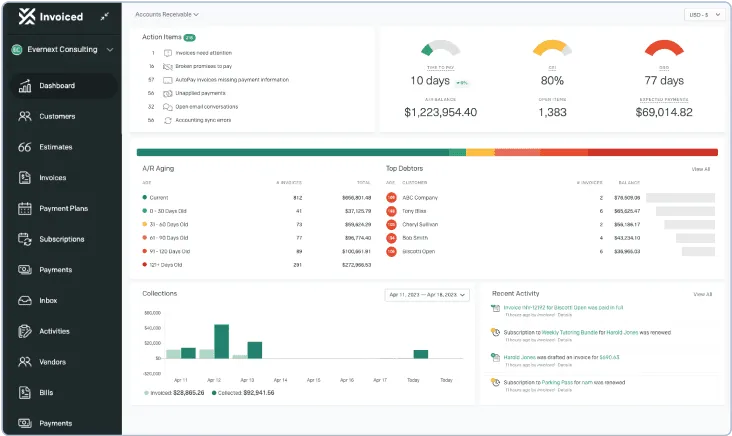
Invoiced is a cloud-based accounts receivable automation system designed to help businesses get paid faster and reduce time spent on billing and collections. Invoiced is easy to integrate, providing billing, collections and payments features that connect seamlessly with QuickBooks. Companies that adopt Invoiced reduce the invoice-to-cash cycle by two weeks on average, reduce bad debt by up to 30%, and increase customer satisfaction by delivering a modern, digital billing and payment experience.

The capabilities of Invoiced's QuickBooks integrations include:

  • Importing data from QuickBooks Online to transfer customers, invoices and transactions
  • Syncing payments between Invoiced and QuickBooks
  • Extracting new data from QuickBooks once per hour

Included features:

  • Direct debit and credit card payments
  • AutoPay
  • Customer portal
  • Chasing and collection tools
  • Payment installment plans
  • Subscription billing
  • Cash flow forecasting

Invoicing and accounts receivable automation for QuickBooks

Automate QuickBooks Billing

Integrate QuickBooks with Invoiced and start streamlining complex billing systems and processes with features like automated billing, online billing access, and recurring billing.

Automate QuickBooks Collections

Pair QuickBooks invoicing with Invoiced to speed up collections through adding automation and robust chasing tools to your account.

QuickBooks Customer Portal Integration

Improve your customer’s payment experience by implementing Invoiced’s self-service payment portal for QuickBooks Online and QuickBooks Desktop.

Sync Your QuickBooks Accounting

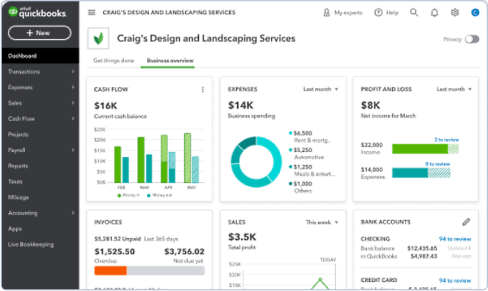
View your company’s latest transactions with the click of a button. Connect to QuickBooks Online or QuickBooks Desktop to make your company’s accounts receivable simple.

What is the Invoiced QuickBooks integration?

Invoiced connects QuickBooks Online and QuickBooks Desktop with accounts receivable automation for invoicing, collections, and payments. Customer and invoice data flows from QuickBooks into Invoiced, while payments collected through Invoiced sync back to QuickBooks with complete payment matching details. This two-way flow keeps your accounting records synchronized without manual data entry or custom development.

The result: your entire accounts receivable automation software runs natively with QuickBooks—billing, collections, payment sync, and accounting all on one platform.

Learn more about accounts receivable automation software

How to connect Invoiced to Quickbooks

Setting up QuickBooks to work with Invoiced is easy. Begin by connecting QuickBooks in Apps → Quickbooks from the Invoiced application.

Quickbooks FAQ — Static HTML (no accordion)

Invoiced and Quickbooks Integration Frequently Asked Questions

Invoiced connects to QuickBooks through a secure, guided setup in your Invoiced account (Apps → QuickBooks). Once connected, data flows automatically between the systems—no custom development required. Customer records and invoices are imported from QuickBooks, payments collected in Invoiced sync back to QuickBooks, and new data from QuickBooks is extracted once per hour to keep systems aligned.

Payments processed in Invoiced post back to QuickBooks instantly. Customer and invoice data from QuickBooks is refreshed once per hour, ensuring your billing and collections data stays current without manual intervention.

Invoiced imports customer records, invoices, and transactions from QuickBooks. When payments are collected in Invoiced, they sync back to QuickBooks with complete payment matching details. This two-way flow ensures your accounting records stay synchronized without manual data entry.

Invoiced supports both QuickBooks Online and QuickBooks Desktop. Setup is the same for both platforms—connect via Apps → QuickBooks in your Invoiced account. All integration features are available regardless of which version you're using.

No. The setup is straightforward and designed for finance teams to handle independently. Most companies connect within a few days. IT can have full visibility and governance if needed, but they don't need to manage the integration day-to-day.

Customers can pay via direct debit, credit card, or AutoPay through Invoiced's branded customer portal. They also have the option to enroll in payment installment plans. All payments are instantly recorded in QuickBooks with full matching details.

Yes. Invoiced lets you configure custom delivery settings (email, print, or both) and automated workflows for payment reminders, follow-ups, and dunning policies. Your team sets these once; the system runs them continuously with no manual intervention needed.

Most teams are live within a few days. The setup is straightforward, and our team is available throughout the process. Unlike enterprise ERPs, QuickBooks integration doesn't require complex configuration or extended timelines.